Wax Studio
Wax Studio gives you control over how Bee generates reports. Instead of getting a one-size-fits-all output, you can choose the writing style, citation format, tone, length, and which sections to include — all before generation begins.
Hive Enterprise Feature
Wax Studio is available exclusively in STING Hive (Enterprise Edition). Community Edition users receive standard report formatting.Overview
When you request a report from Bee, Wax Studio lets you customize the output by selecting a preset or building a custom configuration. Your preferences are injected into the report generation prompt, so the LLM follows your formatting instructions from the start — not as a post-processing step.
Why “Wax”? In a beehive, beeswax is the building material that shapes the honeycomb. Wax Studio shapes the structure of your reports.
How It Works
┌──────────────────────────────────────────────────────────┐
│                  Bee Chat Input Area                      │
│  ┌──────────────────────────────────┐  ┌──────────┐     │
│  │  "Write a report about..."       │  │ 🔥 Wax   │     │
│  └──────────────────────────────────┘  └──────────┘     │
└──────────────────────────────────────────────────────────┘
                         │
                         ▼
┌──────────────────────────────────────────────────────────┐
│              Wax Studio Modal Overlay                     │
│                                                          │
│  ┌─ Quick Presets ──────────────────────────────────┐   │
│  │ Executive Brief │ Research │ Technical │ Quick │  │   │
│  └──────────────────────────────────────────────────┘   │
│                                                          │
│  ┌─ Customize ──────────────────────────────────────┐   │
│  │ Style │ Citations │ Tone │ Length │ Sections      │   │
│  └──────────────────────────────────────────────────┘   │
│                                                          │
│  [ Cap & Generate ]                                      │
└──────────────────────────────────────────────────────────┘
                         │
                         ▼
┌──────────────────────────────────────────────────────────┐
│           Report Generation Pipeline                      │
│                                                          │
│  wax_config → build_wax_instructions() →                 │
│  === REPORT FORMAT INSTRUCTIONS (from Wax Studio) ===    │
│  Appended to report prompt before LLM generation         │
└──────────────────────────────────────────────────────────┘
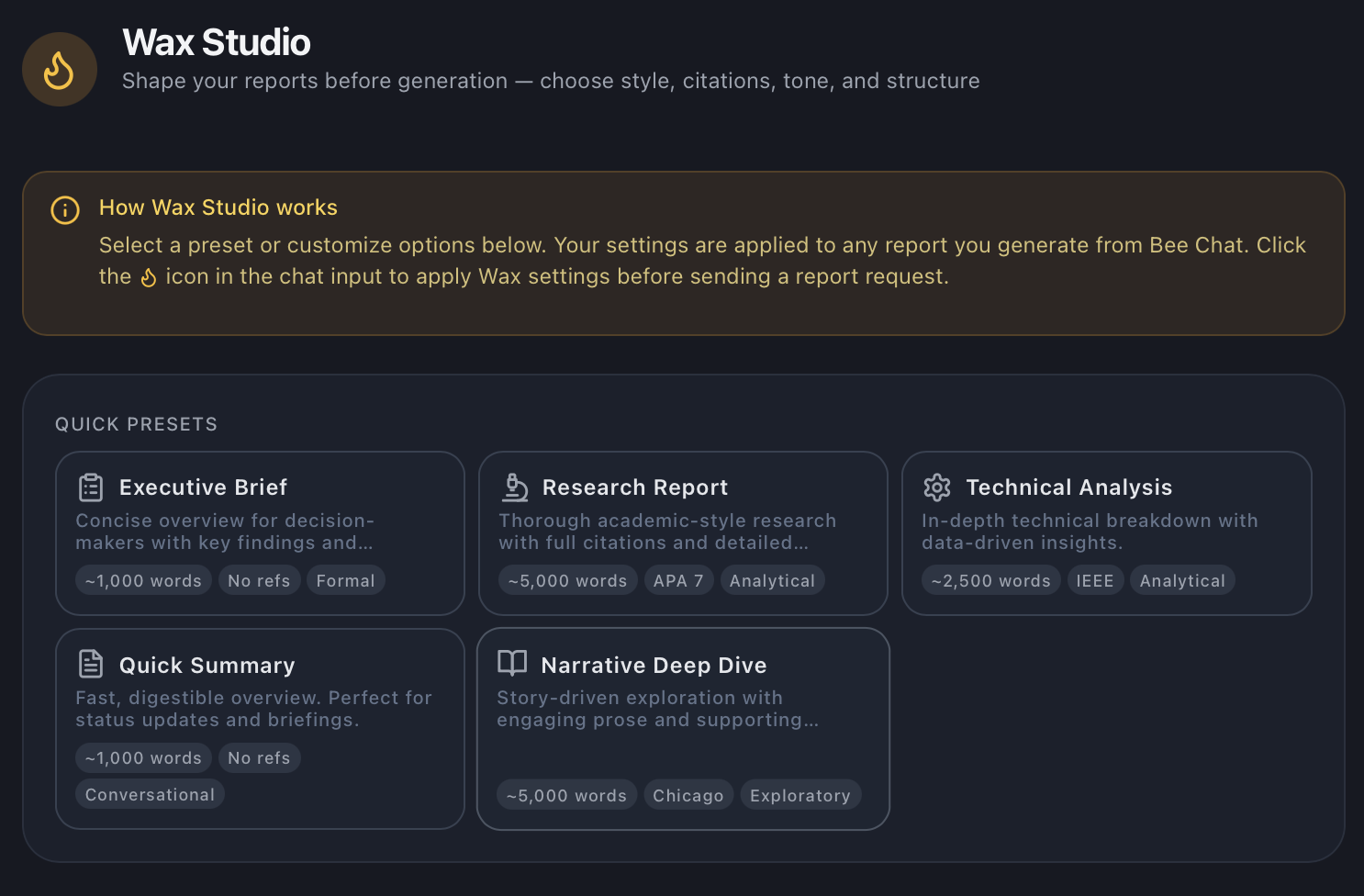
Quick Presets
Presets are one-click configurations that set all options at once. Choose one and hit Cap & Generate to go immediately, or use a preset as a starting point and customize further.
| Preset | Style | Citations | Tone | Length | Sections |
|---|---|---|---|---|---|
| Executive Brief | Concise overview | None | Formal | ~1,000 words | Exec summary, no ToC/refs/appendix |
| Research Report | Academic with methodology | APA 7th | Analytical | ~5,000 words | All sections enabled |
| Technical Analysis | Data-driven breakdown | IEEE | Analytical | ~2,500 words | ToC, refs, appendix (no exec summary) |
| Quick Summary | Digestible overview | None | Conversational | ~1,000 words | Minimal — no ToC, refs, or appendix |
| Narrative Deep Dive | Story-driven exploration | Chicago | Exploratory | ~5,000 words | ToC, refs (no exec summary) |
Customization Options
Report Style
Controls the overall writing approach:
- Executive Brief — Concise, decision-focused, key findings up front
- Research Report — Academic structure with methodology, analysis, and literature review
- Technical Analysis — Data tables, implementation details, metrics-heavy
- General Summary — Accessible plain-language overview
- Narrative — Engaging storytelling with evidence woven in
Citation Format
Choose how sources are referenced:
- APA 7th —
(Author, Year)parenthetical - MLA 9th —
(Author Page)in-text - Chicago — Footnotes with full reference list
- IEEE — Numbered brackets
[1], [2], [3] - Harvard —
(Author Year, p.X)with page numbers - None — Inline attribution without formal citations
Tone / Mood
Sets the voice and register:
- Analytical — Objective, evidence-based reasoning
- Persuasive — Compelling arguments with supporting data
- Neutral — Balanced, no editorial position
- Exploratory — Open-ended, considers multiple perspectives
- Formal — Professional and authoritative
- Conversational — Approachable, plain language
Target Length
Guides the LLM on scope:
- Concise — ~1,000 words, essential points only
- Standard — ~2,500 words, balanced coverage
- Comprehensive — ~5,000 words, thorough deep-dive
- Exhaustive — ~10,000 words, leave no stone unturned
Section Toggles
Enable or disable structural sections:
- Table of Contents — Auto-generated section navigation
- Executive Summary — Top-level findings summary
- References — Source citations and bibliography
- Appendix — Supplementary data, tables, raw sources
Access Points
Chat Modal (Primary)
Click the flame icon in the Bee Chat input area to open the Wax Studio overlay. Select options, then Cap & Generate sends your message with the Wax configuration attached.

An active Wax configuration shows an amber indicator below the chat input displaying the current preset name. Click ✕ to clear it and return to default formatting.
Wax Studio Page
Navigate to Wax Studio in the sidebar for a full-page view. Browse presets, customize settings, and save a personal default that auto-applies to all future reports.
Configuration
Feature Flag
Wax Studio is gated behind the enterprise feature flag:
# config.yml
edition:
  enterprise_features:
    wax_studio: true   # Enable Wax Studio (Hive only)
The backend returns this flag via the /api/config/features endpoint. The frontend checks isEnterpriseFeatureEnabled('waxStudio') before rendering Wax Studio UI elements.
Saved Defaults
Users can save a default Wax configuration that auto-loads when opening the modal:
- Stored in
localStorageunderwax_default_global - Contains full config object + preset ID + timestamp
- Cleared by clicking “Reset” in the modal
Pipeline Integration
Wax Studio settings flow through the entire report pipeline:
- Frontend —
BeeChat.jsxattacheswax_configto the API request body undercontext - Flask API —
chatbot_routes.pypassescontextthrough to report service - Report Service —
report_generators.pyspreads context into the external-ai/bee/chatcall - External AI —
report_orchestrator.pyreadsrequest.context.get('wax_config') - Prompt Builder —
build_wax_instructions()inreport_prompts.pyconverts the config into an LLM instruction block - LLM — Receives the instruction block as part of the report prompt
The instruction block is fenced to ensure the LLM treats it as formatting rules:
=== REPORT FORMAT INSTRUCTIONS (from Wax Studio) ===
WRITING STYLE: Executive Brief — Write a concise executive summary...
CITATION FORMAT: None — Do not include a References section...
TONE: Formal — Maintain a professional, authoritative tone...
=== END REPORT FORMAT INSTRUCTIONS ===
Roadmap
Future phases of Wax Studio include:
- Phase 2 — Database-backed presets (personal, team, org-level), API CRUD, default auto-apply
- Phase 3 — Drag-and-drop section builder (“Wax Cells”) for custom report structure
- Phase 4 — Team Foundations (admin-locked templates), Wax Molds, versioning, compliance templates